ISAD(G) asks you to give a piece of information at the most general level to which it applies, and not to repeat it at lower levels (rule 2.4). Memory Atlas applies this rule: what you enter at the fonds level applies to all its descendants, which show it as an inherited value, as long as they don’t have a value of their own.
What is inherited
| Element | Behavior |
|---|---|
| Name of creator(s) (3.2.1) | inherited; a unit can set its own creators |
| Conditions governing access (3.4.1) | inherited; can be overridden |
| Conditions governing reproduction (3.4.2) | inherited; can be overridden |
| Language/scripts of material (3.4.3) | inherited; can be overridden |
| Physical characteristics and technical requirements (3.4.4) | inherited; can be overridden |
| Rules or conventions (3.7.2) | inherited; by default the repository value (“ISAD(G), 2e éd., ICA, 2000” to begin with, can be changed in File › Repository Identity…) |
| Administrative / Biographical history (3.2.2), Archival history (3.2.3), Immediate source of acquisition or transfer (3.2.4) | shown as context coming from an ancestor; the unit can add its own note |
The other elements (title, dates, extent, scope and content…) belong to each unit.
Enter it once, at the fonds level
At the fonds level, in Complete mode, Léa fills in:
- Conditions governing access: status “Open”;
- Conditions governing reproduction: “© Léa Martin, reproduction by written permission.”;
- Language/scripts of material:
fre(French); - Administrative / Biographical history: a few lines about the photographer.
She doesn’t enter them again anywhere else. The “Negatives” file, three levels down, shows them as inherited values:
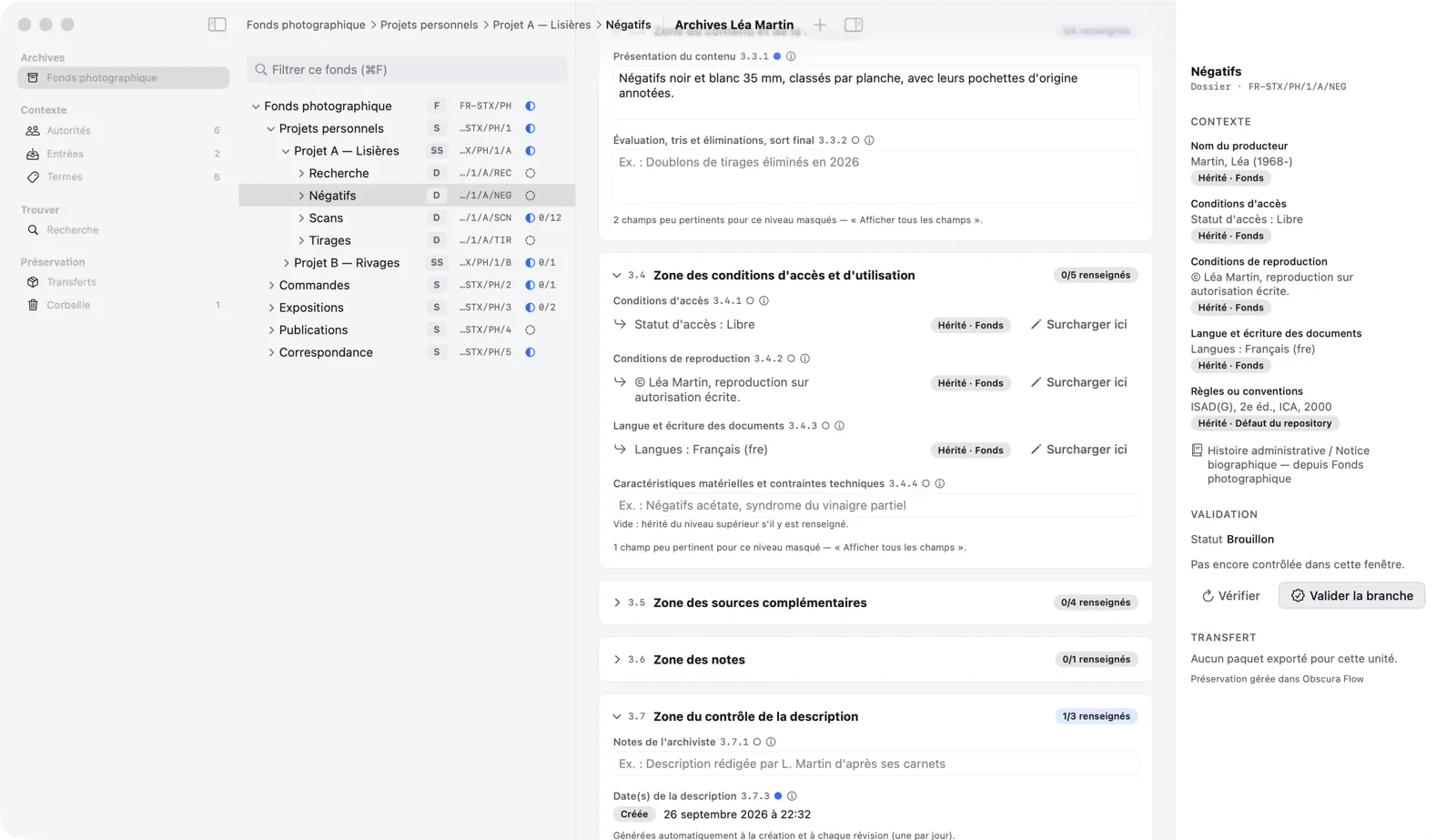
You can tell an inherited value by the ↳ arrow and the Inherited · Fonds label (the level it comes from). Hover over the label to see the title and reference code of the originating unit; click it (Go to origin) to select that unit in the tree.
An inherited value is changed at its origin: change the conditions of reproduction at the fonds level, and every unit in the fonds immediately shows the new value.
Override at a lower level
When a branch is an exception, click Override here: the element gets a value of its own at this level, which its descendants will inherit in turn. The label becomes Local override, and the hidden value is shown below it (“Inherited value: …”).
Restore inheritance deletes the local value: the unit inherits from the level above again. This can be undone (⌘Z).
If you enter a local value identical to the inherited one, Memory Atlas points it out (“Already given at a higher level”) and offers Use inheritance (remove the repetition) or Keep. Validation also catches these repetitions (warning V-12).
The case of the creator
The creator follows the same logic, with the list of authority records instead of text. Léa is the creator of the fonds, and therefore of all its units… except the “Commissions” series, created by the Studio X agency. On “Commissions,” Léa clicked Override here in Name of creator(s), removed her own name and added “Studio X”:
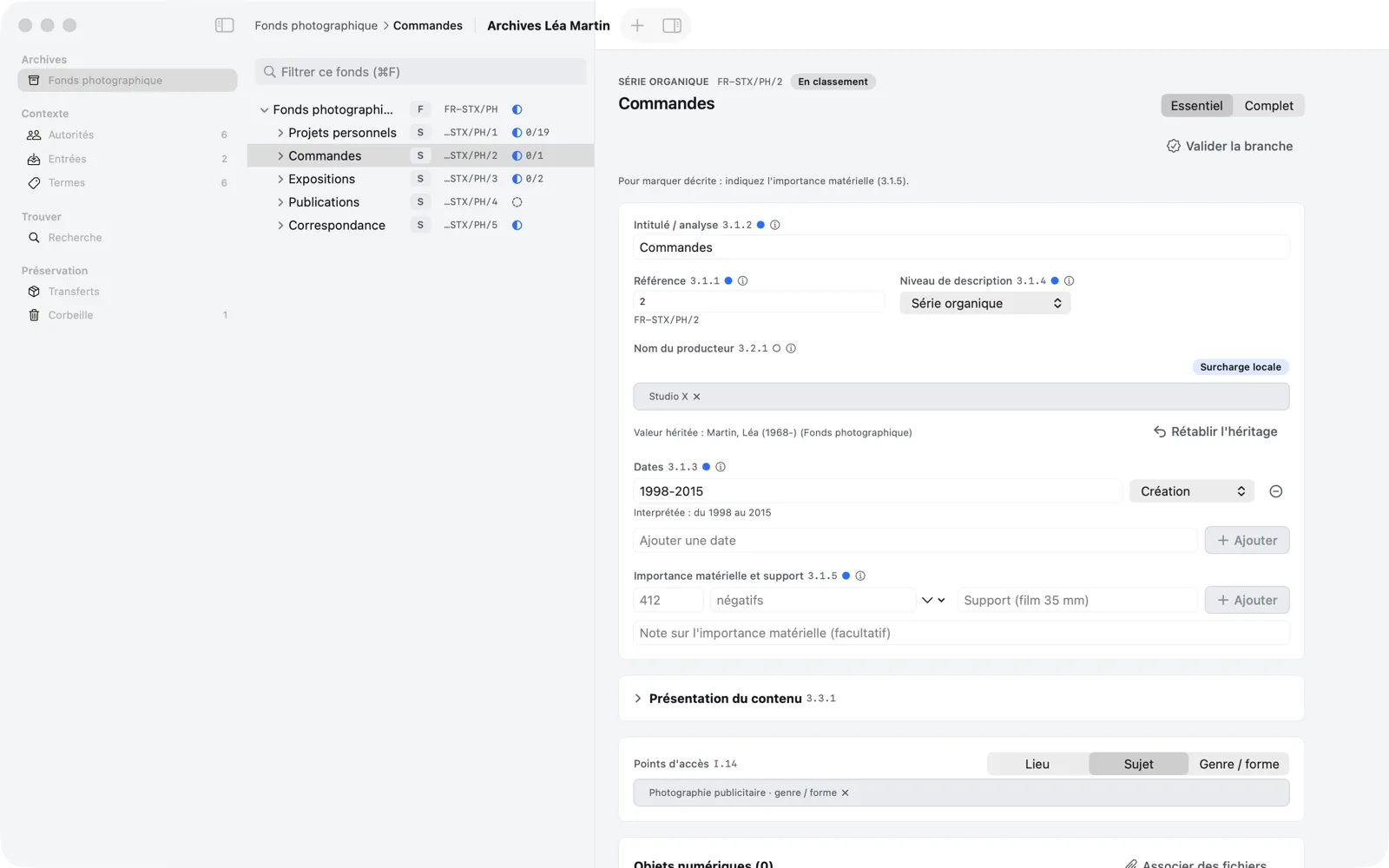
All the units under “Commissions” now have Studio X as their creator; the rest of the fonds keeps Léa Martin. Creating and choosing authority records is covered in detail in the next chapter.
The inspector
The inspector (the button on the right of the toolbar, or View › Show Inspector, ⌥⌘I) summarizes the selected unit without scrolling through the description:
- Context: the creator and each inherited or local element passed down to descendants, with its origin (Inherited · Fonds, Inherited · Repository default, Local, Local override); clicking the origin takes you there;
- Validation: the unit’s status, the result of its last check, and the Check buttons (checks this unit alone, without changing its status) and Validate Branch;
- Transfer: the state of the last package exported for this unit, if there is one.
The inspector is open from the start on a large screen and closed on a smaller one; Memory Atlas then remembers your choice for each window. In a narrow window (less than about 1,320 points), opening it collapses the sidebar to make room for the tree and the description; the sidebar comes back when you close the inspector. Conversely, if you reopen the sidebar with its button or ⌃⌘S, the inspector closes; it comes back when you collapse the sidebar, or when the window becomes wide enough again.