Archival description for macOS
Describe your archives. Hand down their memory.
Memory Atlas builds the tree of your fonds, describes each level to ISAD(G), links it to its creators and to your files, then prepares a transfer package for Obscura Flow.
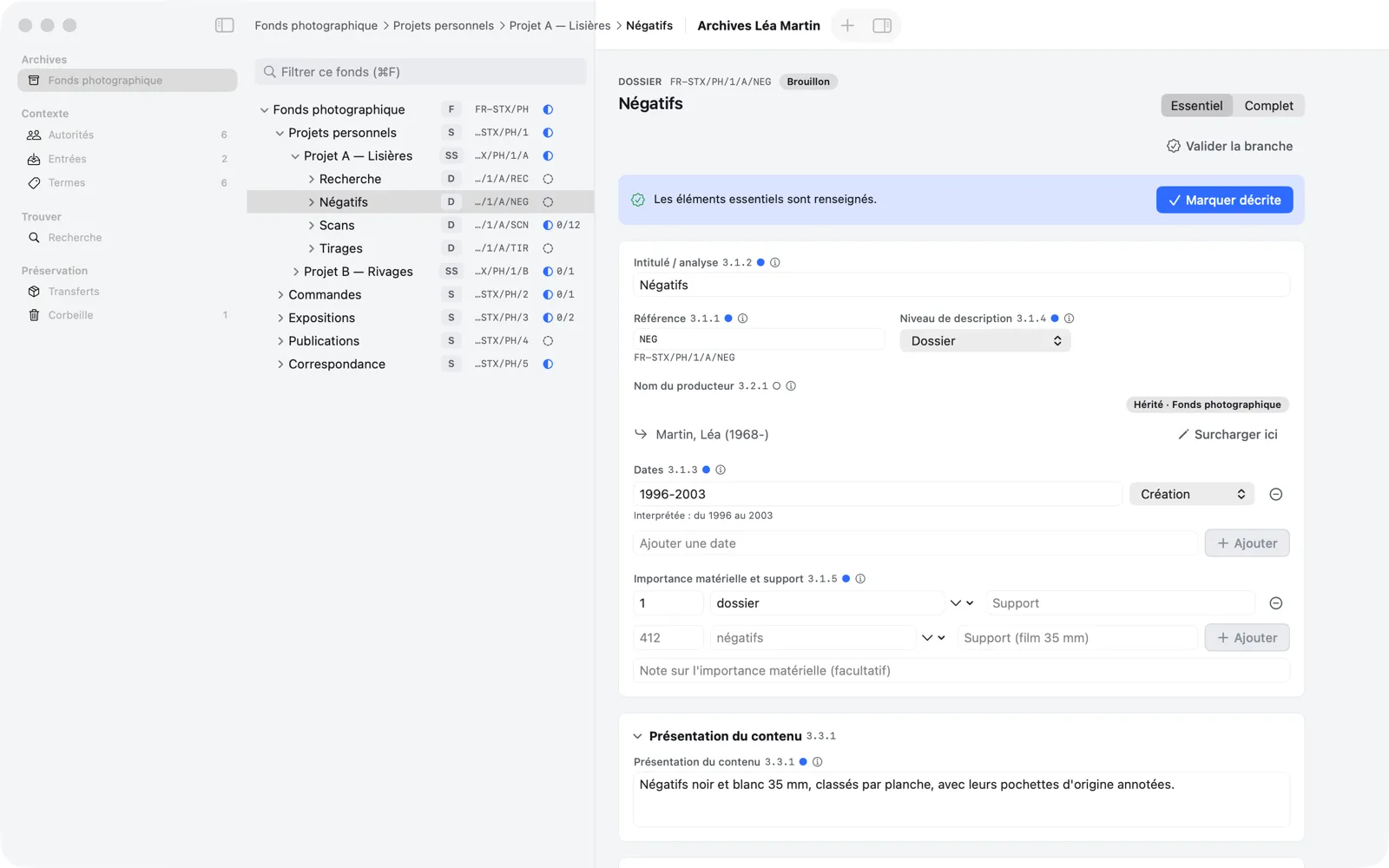
Describe to ISAD(G)
Prepare for preservation
Why
A fonds is lost less through its files than through its context.
Finder folders tell the story of files, not of the work. Memory Atlas separates the intellectual unit — “Negatives, Project A” — from the file that digitizes it, and keeps context visible everywhere.
Archives without a plan
The fonds, series, file, item tree gives every document its place, with a reference code composed automatically.
The same information ten times
Inheritance applies the ISAD(G) rule of non-repetition: stated at the fonds, it holds for the whole branch.
Creators poorly identified
Authority records link each fonds to the persons, families, and corporate bodies that created it.
Scattered files
Files stay in the Finder; Memory Atlas keeps the link and flags the one that went missing.
Forgotten provenance
The accession register records gifts, deposits, and purchases, linked to the fonds that came from them.
An uncertain handover
Validation checks every unit before exporting a documented transfer package for Obscura Flow.
Method
From tree to transfer package, without a break.
Memory Atlas follows the description of a fonds, from the first level created to its delivery for preservation.
- 01
Create
A repository is an .atlas file on your disk, identified by a country code and a repository code. One window, one repository.
- 02
Arrange
Build the tree of the fonds and move branches by drag and drop: each unit's reference code recomposes itself.
- 03
Describe
Fill in the ISAD(G) elements, six to start with, twenty-six to go all the way. Everything is saved; everything undoes with ⌘Z.
- 04
Contextualize
Link creators, persons, and corporate bodies, index places and subjects, tie the fonds to its accession.
- 05
Link
Attach digital files to their units without copying them; Memory Atlas checks that they are still there.
- 06
Search
Find a person, a place, or a date anywhere in the repository, with each result's path in the tree.
- 07
Validate
Check a whole branch before handing it over: errors to fix, warnings to accept knowingly.
- 08
Transfer
Export a transfer package for Obscura Flow, which preserves the files, and track its delivery.
Features
The rigor of ISAD(G), the ease of a Mac app.
Every screen shows the level, reference code, and context of the unit, so you describe without losing the thread.
Archival tree
Build the arrangement of a fonds from the general to the specific: fonds, sub-fonds, series, sub-series, files, and items.

ISAD(G) description
All 26 elements of the standard, in 7 areas. Essential mode shows only 6; Complete mode shows them all (⌘E).

Authority records
Persons, families, and corporate bodies described once, then linked to units as creators or as subjects.

Digital objects
Attach scans, photographs, PDFs, or sound files to a unit. Memory Atlas keeps a link to each file, never a copy.

Search and palette
Full-text search across the whole repository, with filters and a breadcrumb on every result, plus a command palette.

Validation
Before handing over, Memory Atlas checks every unit of a branch against fourteen rules, from title to creator.

Inheritance
Say it once, at the right level.
The creator, access conditions, or language entered at the fonds level apply to all its descendants, which show them as inherited values, with their origin. An exception? “Override here” limits it to one unit and its branch.
Understand inheritance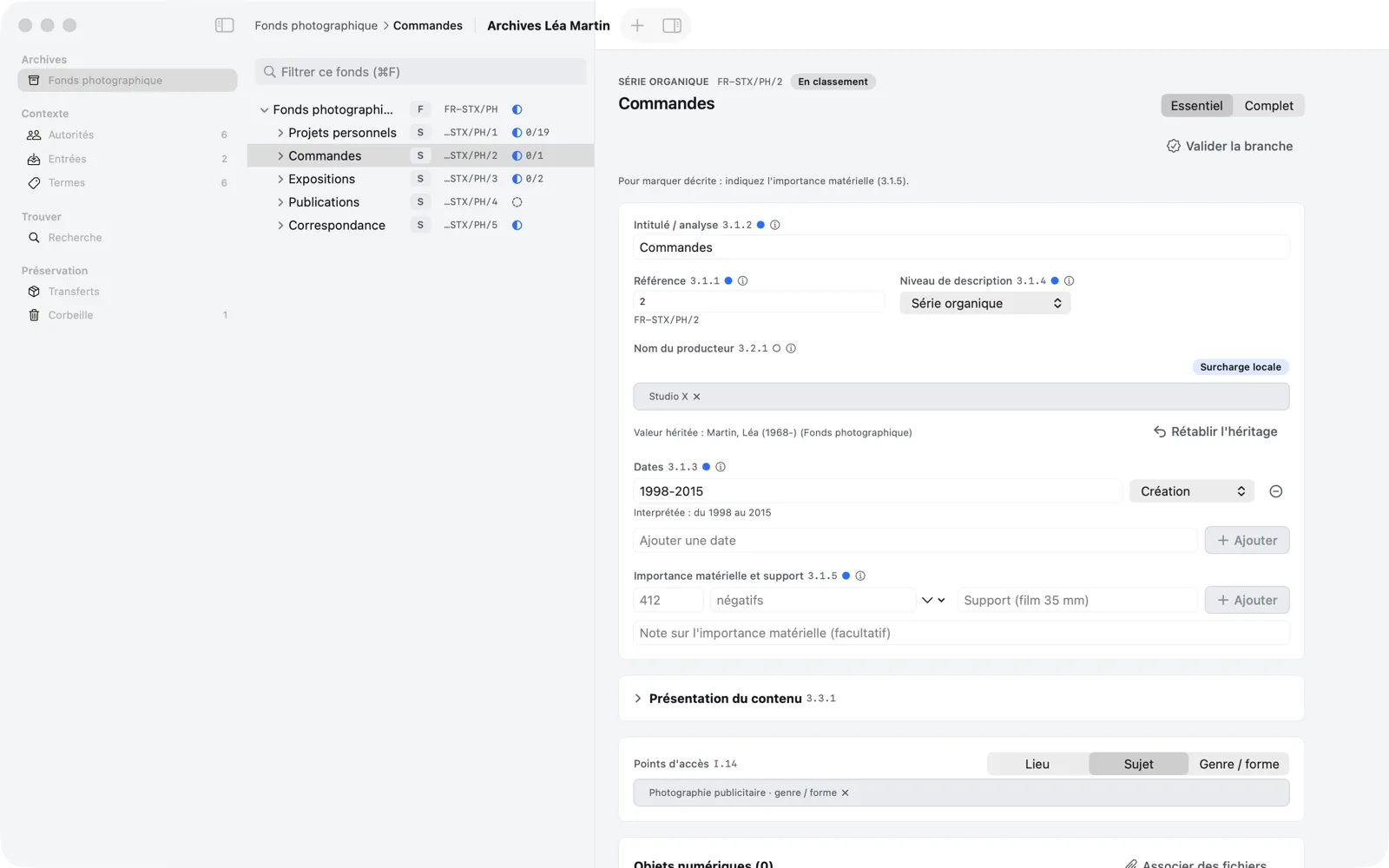
Preservation
Prepare the handover to Obscura Flow.
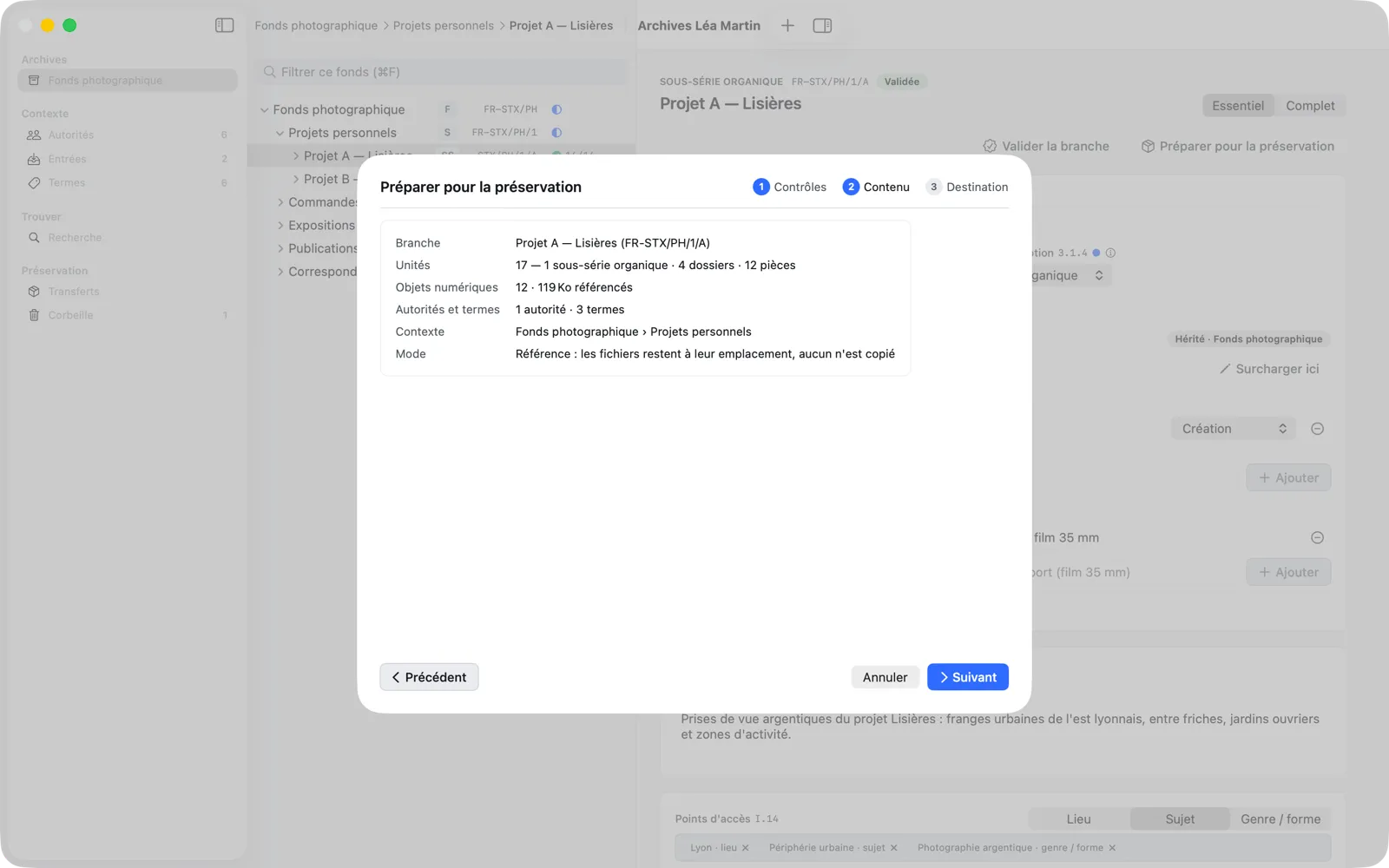
“Prepare for Preservation” re-runs the validation checks, adds the transfer checks, then exports the branch as a documented package to the folder of your choice. You import it into Obscura Flow, which preserves the files, and track its delivery.
Validate and transferPrinciples
Local, private, reversible.
Memory Atlas is a description tool that respects your archives: nothing leaves your Mac, nothing changes without a way back.
100% local
No account, no data sent: the only connection is the update check, which you can turn off. A repository is a file on your Mac.
Your files untouched
Memory Atlas never copies, moves, or modifies a digital file: it keeps a link, and only reads its header.
Everything undoes
⌘Z undoes every change, including moving a branch, a validation, or an export.
Safety copies
A copy of the database each time it opens, then periodically while you edit, a full check every week, and a restore in a few clicks.
Built for volume
Tested on 100,000 units: opening, searching, and moving branches stay instant.
Native and accessible
A real Mac app, in French and English, usable from the keyboard and with VoiceOver.
Who it's for
For those who hold a fonds and want to hand it down.
Memory Atlas is designed for a creator or an archivist working alone, on a Mac.
Photographers
Hand down thirty years of negatives, scans, prints, and correspondence as an understandable body of work.
Independent archivists
Deliver a clean, checked, exportable ISAD(G) description to a client.
Associations
Find a document and know where it comes from, without fear of breaking the arrangement.
Artists and studios
Document series, exhibitions, and publications around the files that digitize them.
Families
Bring together a family fonds, its creators and its places, before entrusting it to an institution.
Heirs and researchers
Look for a person, a place, or a date in a described fonds, in context.
FAQ
Frequently asked questions.
Scope, files, privacy, and the link with Obscura Flow.
What is Memory Atlas?
A native macOS app to arrange and describe archives to the ISAD(G) standard: you build the tree of a fonds, describe each unit, link it to its creators, index terms, and files, then export a validated branch as a transfer package for Obscura Flow.
Who is it for?
For a creator or an archivist working alone on a Mac: a photographer handing down their work, an independent archivist, an association, a family. Multi-user needs of a public archives service are not covered by this version.
Do I need to know ISAD(G) to use it?
No. Essential mode shows only the six mandatory elements, and every field displays the standard's guidance. Complete mode opens up all twenty-six elements when you need them.
Does Memory Atlas copy my files?
Never. Files stay where they are in the Finder; the repository keeps a link to each one, with a few metadata read from their header (size, dimensions, date). If a file moves, Memory Atlas flags it as “not found” and offers to locate it.
How is it different from Obscura Flow?
Memory Atlas describes archives; Obscura Flow preserves files (checksums, integrity checks, copies). The two apps do not connect: Memory Atlas exports a transfer package that you import into Obscura Flow yourself, then mark as delivered.
Does my data leave my Mac?
No. Memory Atlas works with no account and no analytics, and sends none of your repository content. Its only connection is the update check, which you can turn off in Settings › General. A repository is an .atlas file that you store, back up, and pass on as you see fit.
Next step
Give your archives a description that lasts.
Memory Atlas 0.3 is available on request. Tell us about your fonds and we will send you the app.